


Most UptoDate Microsoft PL-100 Exam Dumps PDF 2022
100% Free Microsoft Certified: Power Platform App Maker Associate PL-100 Dumps PDF Demo Cert Guide Cover
Schedule exam
Languages: English, Japanese
Retirement date: none
This exam measures your ability to accomplish the following technical tasks: design business solutions; create solutions; and analyze and visualize data.
How to book the Microsoft PL-100 Exam
These are following steps for registering the Microsoft PL-100 exam.
- Step 1: Visit to Microsoft Exam Registration
- Step 2: Sign up/Login to account
- Step 3: Select local centre based on your country, date, time and confirm with a payment method.
NEW QUESTION 16
Note: This question is part of a series of questions that present the same scenario. Each question in the series contains a unique solution that might meet the stated goals. Some question sets might have more than one correct solution, while others might not have a correct solution.
After you answer a question in this section, you will NOT be able to return to it. As a result, these questions will not appear in the review screen.
You are creating a canvas app.
You need to automatically detect bicycles in pictures taken with the camera.
Proposed solution:
Create a Category Classification custom model in AI Builder.
Train the model with pictures of bicycles and then publish the trained model.
Add the Object Detector control to your canvas app.
Does the solution meet the goal?
- A. No
- B. Yes
Answer: A
Explanation:
Instead create an Object Detection custom model
Reference:
https://docs.microsoft.com/en-us/ai-builder/prediction-overview
https://docs.microsoft.com/en-us/ai-builder/object-detector-component-in-powerapps
NEW QUESTION 17
You are an app maker for a college. You create an app for student enrollment. The app captures the education level of the applicants.
The education level at the time of enrollment is an option set is in the student entity. The entity includes three levels:
High school
College
Bachelor
You must split the College option into two option sets:
College - 1 Year
College - 2 years
The split must not impact existing data.
You need to create the two option sets.
Which three actions should you perform in sequence? To answer, move the appropriate actions from the list of actions to the answer area and arrange them in the correct order.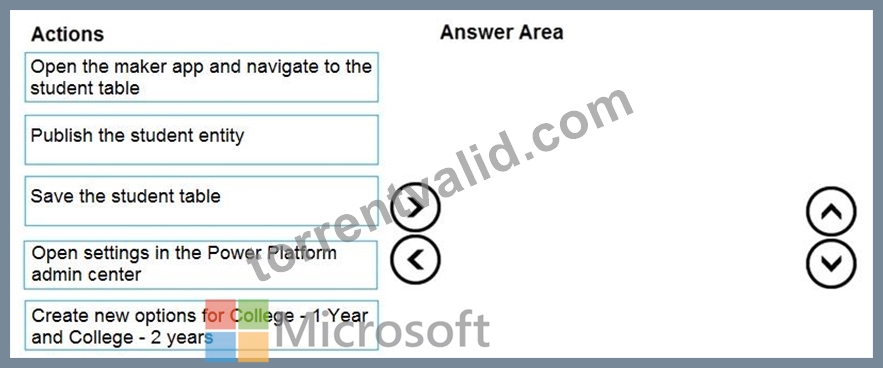
Answer:
Explanation: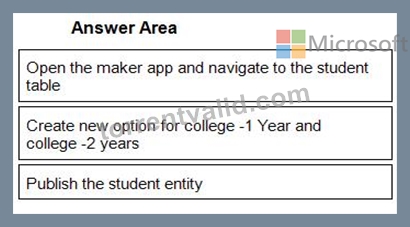
1 - Open the maker app and navigate to the student table
2 - Create new option for college -1 Year and college -2 years
3 - Publish the student entity
NEW QUESTION 18
Note: This question is part of a series of questions that present the same scenario. Each question in the series contains a unique solution that might meet the stated goals. Some question sets might have more than one correct solution, while others might not have a correct solution.
After you answer a question in this section, you will NOT be able to return to it. As a result, these questions will not appear in the review screen.
You are creating a canvas app that displays a list of accounts.
Users must be able to select an account and view details for the account. The app must include a feature that brings the user back to the list of accounts.
You add a blank screen named Screen_Accounts and add a gallery named Gallery_Accounts to the screen. You set the data source of Gallery_Accounts to Accounts and add another blank screen named Screen_AccountDetail.
You need to complete the app.
Solution:
* Add a display form to Screen_AccountDetail.
* Set the OnSelect property of Gallery_Accounts to Navigate(Screen_AccountDetail).
* Set the data source of the form to Accounts.
* Set the Item property of the form to Selected.
* Add a back icon on Screen_AccountDetail and set its OnSelect property to Navigate(Screen_Accounts).
Does the solution meet the goal?
- A. No
- B. Yes
Answer: B
Explanation:
If you add a Display form control, the user can display all fields of a record or only the fields that you specify.
Reference:
https://docs.microsoft.com/en-us/powerapps/maker/canvas-apps/controls/control-form-detail
NEW QUESTION 19
Note: This question is part of a series of questions that present the same scenario. Each question in the series contains a unique solution that might meet the stated goals. Some question sets might have more than one correct solution, while others might not have a correct solution.
After you answer a question in this section, you will NOT be able to return to it. As a result, these questions will not appear in the review screen.
A company has locations in multiple countries and regions across four continents.
The company stores the total amount of each order in the local currency of the country/region where the customer is located. The company stores the applicable exchange rates in a custom US dollars (USD) exchange rate table.
You need to create a visualization that displays the total amount of orders by country/region in USD.
Proposed solution:
Create a custom column that converts the order total to USD by using the relationship between order local currency and the USD exchange rate table in Power BI Desktop and display this column in a Power BI chart by country/region.
Does the solution meet the goal?
- A. No
- B. Yes
Answer: A
Explanation:
Instead use a calculated field.
Need to calculate the exchange rate in USD.
Calculated columns are calculated in real-time when they are retrieved.
Reference:
https://docs.microsoft.com/en-us/powerapps/developer/data-platform/calculated-rollup-attributes
NEW QUESTION 20
You need to configure the system to meet the requirements.
What should you use? To answer, select the appropriate options in the answer area.
NOTE: Each correct selection is worth one point.
Answer:
Explanation:
Reference:
https://docs.microsoft.com/en-us/powerapps/maker/common-data-service/types-of-entities
NEW QUESTION 21
You are creating an app for an organization's human resources (HR) department. You create an Employee entity in an unmanaged Common Data Service solution.
Another user creates the following Power Automate flows separately from the solution:
You need to incorporate the flows that can be added to the solution.
Which two flows can you include? Each correct selection presents a complete solution.
NOTE: Each correct selection is worth one point.
- A. FlowD
- B. FlowC
- C. FlowA
- D. FlowB
Answer: A,C
Explanation:
You can add any of these conditions to determine precisely when your flow is triggered.
Reference:
https://docs.microsoft.com/en-us/power-automate/connection-cds-native
NEW QUESTION 22
You need to meet the requirements for sales representative that submit status reports.
How should you configure the flow?
- A. Add a parallel branch that uses the value of a dynamic content variable
- B. Add a condition that evaluates the risk value by using a dynamic content variable
- C. Add a data operation action that evaluates a dynamic content variable
- D. Add a number functions action that evaluates the risk value by using a static variable to determine if an email is required
Answer: B
Explanation:
Salespeople often do not set status of RFQs in the Sales Log to Won when a sale is closed and the customer purchase order is received.
Include a dashboard that shows all currently active quotes, their status in the sales cycle, the probability of closing, and estimated manufacturing and installation dates, by customer, product division, status, and salesperson.
This is a case study. Case studies are not timed separately. You can use as much exam time as you would like to complete each case. However, there may be additional case studies and sections on this exam. You must manage your time to ensure that you are able to complete all questions included on this exam in the time provided.
To answer the questions included in a case study, you will need to reference information that is provided in the case study. Case studies might contain exhibits and other resources that provide more information about the scenario that is described in the case study. Each question is independent of the other questions in this case study.
At the end of this case study, a review screen will appear. This screen allows you to review your answers and to make changes before you move to the next section of the exam. After you begin a new section, you cannot return to this section.
To start the case study
To display the first question in this case study, click the Next button. Use the buttons in the left pane to explore the content of the case study before you answer the questions. Clicking these buttons displays information such as business requirements, existing environment, and problem statements. When you are ready to answer a question, click the Question button to return to the question.
Background
Current environment
Overview
Operations for the company are managed very informally. Only a small number of long-term employees are aware of all manufacturing processes.
NEW QUESTION 23
The company is adding a multi-stream interactive dashboard to a model-driven app.
The company requires configuration of the dashboard to filter the table data based on modified accounts over the last month.
You need to configure the filters for the model-driven app dashboard.
Which configuration should you use? To answer, drag the appropriate locations to the correct requirements. Each configuration may be used once, more than once, or not at all. You may need to drag the split bar between panes or scroll to view content.
NOTE: Each correct selection is worth one point.
Answer:
Explanation:
Reference:
https://docs.microsoft.com/en-us/powerapps/maker/model-driven-apps/configure-interactive-experience-dashboards
NEW QUESTION 24
You are configuring a new Common Data Service environment by using the Power Apps Maker portal.
You need to create an entity that uses the prefix xyz.
Which four actions should you perform in sequence? To answer, move the appropriate actions from the list of actions to the answer area and arrange them in the correct order.
Answer:
Explanation:
Reference:
https://docs.microsoft.com/en-us/powerapps/maker/common-data-service/data-platform-create-entity
NEW QUESTION 25
A company must use a Power Apps app custom control that is exported from a different canvas Power Apps app.
You need to insert the custom control into the Power Apps app.
Where should you complete the actions? To answer, drag the appropriate locations to the correct actions. Each location may be used once, more than once, or not at all. You may need to drag the split bar between panes or scroll to view content.
NOTE: Each correct selection is worth one point.
Answer:
Explanation:
Reference:
https://docs.microsoft.com/en-us/powerapps/developer/component-framework/component-framework-for-canvas-apps
NEW QUESTION 26
You need to implement logic in the app for lost sales.
What should you do?
- A. Create a business process flow.
- B. Create a formula for the Description field that uses the Update function.
- C. Define a business rule for the Sales Log edit form.
- D. Set the required field property of the Won/Lost field to Required.
Answer: C
Explanation:
Scenario: Requests for quotes are currently stored in a Sales Log workbook. The workbook includes the following information:
* Status of the Request for Quote (RFQ) with the values of Won, Lost, No Bid, and Cancelled Salespeople often do not set status of RFQs in the Sales Log to Won when a sale is closed and the customer purchase order is received.
You can create business rules and recommendations to apply logic and validations without writing code or creating plug-ins. Business rules provide a simple interface to implement and maintain fast-changing and commonly used rules.
Business rules defined for an entity apply to both canvas apps and model-driven apps if the entity is used in the app.
Reference:
https://docs.microsoft.com/en-us/powerapps/maker/common-data-service/data-platform-create-business-rule Analyze and visualize data Question Set 1
NEW QUESTION 27
You create the following apps for a company that provides financial guidance services: a model-driven app for financial advisers that work in the company's offices and a canvas app for remote financial advisers.
You need to create business rules for a custom counselling entity used by all financial advisers.
Who will be affected by the business rules?
To answer, drag the appropriate financial adviser types to the correct business rules. Each financial adviser type may be used once, more than once, or not at all. You may need to drag the split bat between panes or scroll to view content.
NOTE: Each correct selection is worth one point.
Answer:
Explanation:
Reference:
https://docs.microsoft.com/en-us/powerapps/maker/data-platform/data-platform-create-business-rule
NEW QUESTION 28
A company has the following divisions: wholesale and retail.
The manufacturer wants to create a single Power BI report to allow users to view data from a Microsoft SQL Server database.
You need to ensure that each user sees data only for the team to which the user is assigned.
How should you secure the report?
To answer, drag the appropriate options to the correct action. Each option may be used once, more than once, or not at all. You may need to drag the split bar between panes or scroll to view content.
NOTE: Each correct selection is worth one point.
Answer:
Explanation:
Reference:
https://docs.microsoft.com/en-us/power-bi/create-reports/desktop-rls
NEW QUESTION 29
You need to store a list of products and their colors. You have a Power Apps app that includes the following elements:
a text box for the product name
a drop-down list for the product color
a button to add a product to the list
a status message that shows whether the addition of a product to the list was successful The button uses the following formula: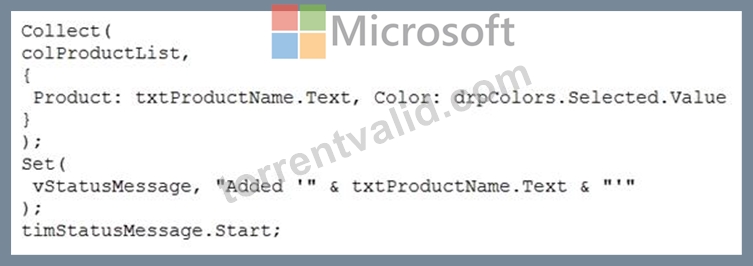
For each of the following statements, select Yes if the statement is true. Otherwise, select No.
NOTE: Each correct selection is worth one point.
Answer:
Explanation:
Reference:
https://docs.microsoft.com/en-us/powerapps/maker/canvas-apps/functions/function-clear-collect-clearcollect
https://docs.microsoft.com/en-us/powerapps/maker/canvas-apps/functions/function-set
NEW QUESTION 30
You plan to create apps for a company.
You need to identify the Power Platform tools required.
What should you use? To answer, drag the appropriate tools to the correct requirements. Each tool may be used once, more than once, or not at all. You may need to drag the split bar between panes or scroll to view content.
NOTE: Each correct selection is worth one point.
Answer:
Explanation:
Reference:
https://docs.microsoft.com/en-us/power-virtual-agents/authoring-fundamentals
https://docs.microsoft.com/en-us/power-automate
NEW QUESTION 31
You need to store a list of products and their colors. You have a Power Apps app that includes the following elements:
a text box for the product name
a drop-down list for the product color
a button to add a product to the list
a status message that shows whether the addition of a product to the list was successful The button uses the following formula:
For each of the following statements, select Yes if the statement is true. Otherwise, select No.
NOTE: Each correct selection is worth one point.
Answer:
Explanation:
Reference:
https://docs.microsoft.com/en-us/powerapps/maker/canvas-apps/functions/function-clear-collect-clearcollect
https://docs.microsoft.com/en-us/powerapps/maker/canvas-apps/functions/function-set
NEW QUESTION 32
You need to create the solution assets.
What should you use to create the visualizations? To answer, select the appropriate options in the answer area.
NOTE: Each correct selection is worth one point.
Answer:
Explanation:
Explanation:
Box 1: PowerBI Desktop
The Sales dashboard must reside in the Sales channel and must include information about active quotes, sales pipeline, and year-to-date sales KPIs for sales quotas by region.
PowerBI Desktop to support many data source.
Box 2: PowerBI Desktop or Power BI Service on
A dashboard that shows a capacity Heat map by month as well as expected sales that are likely to close for the next month.
Both support visualizations.
NEW QUESTION 33
You use a Microsoft SharePoint list to record information about customers.
You must perform a series of actions only when a new item is added to a SharePoint list.
You need to configure a Power Automate flow.
Which trigger should you use?
- A. When a file is created (properties only)
- B. When an item is created
- C. When an item is created or modified
- D. For a selected item
Answer: B
Explanation:
Trigger - When an item is created
Triggers when an item is created.
MS Flow will trigger when an item is created in the list. It will return all list item properties which can be used in the Flow.
Reference:
https://www.c-sharpcorner.com/article/sharepoint-based-triggers-in-ms-flow-part-2/
NEW QUESTION 34
A company must use a Power Apps app custom control that is exported from a different canvas Power Apps app.
You need to insert the custom control into the Power Apps app.
Where should you complete the actions? To answer, drag the appropriate locations to the correct actions. Each location may be used once, more than once, or not at all. You may need to drag the split bar between panes or scroll to view content.
NOTE: Each correct selection is worth one point.
Answer:
Explanation:
Reference:
https://docs.microsoft.com/en-us/powerapps/developer/component-framework/component-framework-for-canvas-apps
NEW QUESTION 35
......
Updated Microsoft PL-100 Dumps – PDF & Online Engine: https://www.torrentvalid.com/PL-100-valid-braindumps-torrent.html
PDF Exam Material 2022 Realistic PL-100 Dumps Questions: https://drive.google.com/open?id=13zyVLWagR9fW1hI8dSBCSKVZk9Kh_Mmv