


Get Started: FCSS_LED_AR-7.6 Exam [2026] Dumps Fortinet PDF Questions
FCSS_LED_AR-7.6 Premium Exam Engine pdf Download
Fortinet FCSS_LED_AR-7.6 Exam Syllabus Topics:
| Topic | Details |
|---|---|
| Topic 1 |
|
| Topic 2 |
|
| Topic 3 |
|
| Topic 4 |
|
NEW QUESTION # 59
To view FortiAP debug logs in the CLI, which command is used?
Response:
- A. execute wireless ap debug start
- B. debug controller-ap
- C. diagnose debug enable → diagnose debug application cw_ac -1
- D. diagnose wireless-controller wlac -c
Answer: C
NEW QUESTION # 60
Connectivity tests are being performed on a newly configured VLAN. The VLAN is configured on a FortiSwitch device that is managed by FortiGate. During testing, it is observed that devices within the VLAN can successfully ping FortiGate. and FortiGate can also ping these devices.
Inter-VLAN communication is working as expected. However, devices within the same VLAN are unable to communicate with each other.
What could be causing this issue?
- A. Access VLAN is enabled on the VLAN.
- B. The FortiSwitch MAC address table is missing entries.
- C. The native VLAN configured on the ports is incorrect.
- D. The FortiGate ARP table is missing entries.
Answer: A
Explanation:
Observed behavior:
* Devices in the VLANcan ping FortiGate# gateway reachability OK.
* FortiGatecan ping devicesin that VLAN # return path OK.
* Inter-VLAN routingworks # FortiGate's L3 and policies are fine.
* Devices in the same VLAN cannot ping each other# problem is on theL2 switching plane, not L3.
On FortiSwitch (managed by FortiGate), there is a feature calledAccess VLAN(sometimes described in NAC
/dynamic segmentation context):
* WhenAccess VLANis enabled on a VLAN, the switchdoes not perform normal L2 forwarding between hosts in that VLAN.
* Instead, all traffic from endpoints in that VLAN isforced upstream to FortiGate, as if every frame were destined for the gateway.
* This is used for designs where you wantall intra-VLAN traffic inspected by the firewall, implementing micro-segmentation.
Resulting behavior:
* Host # FortiGate: works (frames are forwarded to FortiGate).
* FortiGate # Host: works (routed back).
* Host A # Host B (same VLAN):
* Frame from A goes to FortiGate.
* FortiGate seessource and destination in same subnet; depending on policy, it may drop or not have a policy allowing that traffic.
* Even if allowed, certain designs still break pure L2 expectations.
In the exam scenario, the key point is:
IfAccess VLAN is enabled,local L2 communication within that VLAN is disabled, so hosts in the same VLAN cannot communicate directly.
That perfectly explains:
* Same VLAN hosts can't ping each other
* But they can both reach FortiGate and beyond
Why the other options are less likely / incorrect
* B. FortiSwitch MAC address table is missing entries
* If MAC table were empty/bad,nothingin that VLAN would work properly, including pinging FortiGate.
* C. FortiGate ARP table is missing entries
* Then FortiGate couldn't ping the devices either; but it can.
* D. Native VLAN misconfigured on ports
* That would affect connectivity to FortiGate too, not only host-to-host.
NEW QUESTION # 61
Which authentication methods can be used in FortiAuthenticator for two-factor authentication with digital certificates?
(Choose two)
Response:
- A. EAP-TLS
- B. Radius with push token
- C. EAP-PEAP
- D. SAML
Answer: A,D
NEW QUESTION # 62
In a Zero-Touch Provisioning (ZTP) deployment, which device typically initiates the connection to FortiManager?
Response:
- A. FortiAP
- B. FortiSwitch
- C. FortiGate
- D. FortiAuthenticator
Answer: C
NEW QUESTION # 63
You configure FortiAuthenticator syslog to a remote FortiAnalyzer. What additional feature becomes available with this integration?
Response:
- A. Certificate Authority Management
- B. Log Analytics and Reports
- C. Local Authentication Proxy
- D. RADIUS Dictionary Customization
Answer: B
NEW QUESTION # 64
You are preparing FortiManager for ZTP. Which CLI command enables provisioning mode?
Response:
- A. set central-mgmt enable
- B. config system provisioning
- C. set allow-register enable
- D. set ztp enable
Answer: C
NEW QUESTION # 65
What is the main benefit of VLAN pooling in wireless deployments?
Response:
- A. Disables rogue AP detection
- B. Reduces DHCP exhaustion and improves load distribution
- C. Enables NAT between VLANs
- D. Forces clients to connect via MAC address
Answer: B
NEW QUESTION # 66
Refer to the exhibits.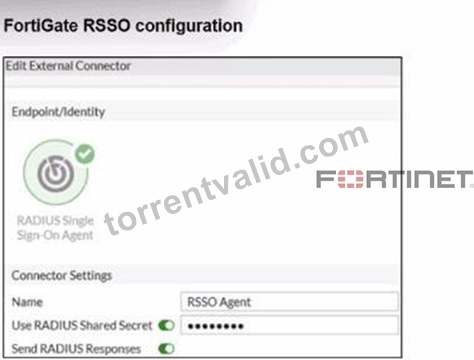

Examine the FortiGate RSSO configuration shown in the exhibit.
FortiGate is set up to use RSSO for user authentication. It is currently receiving RADIUS accounting messages through port3. The incoming RADIUS accounting messages contain the username in the User- Name attribute and group membership in the Class attribute. You must ensure that the users are authenticated through these RADIUS accounting messages and accurately mapped to their respective RSSO user groups.
Which three critical configurations must you implement on the FortiGate device? (Choose three.)
- A. The sso-attribute CLI setting in the RSSO agent configuration should be set to Class.
- B. Device detection and Security Fabric Connection should be enabled on port3
- C. RSSO user groups should be assigned to all firewall policies.
- D. The rsso-endpoint-attribute CLI setting in the RSSO agent configuration should be set to User-Name.
- E. The RADIUS Attribute Value setting configured for an RSSO user group should match the class RADIUS attribute value in the RADIUS accounting message.
Answer: A,D,E
Explanation:
The problem states:
* FortiGate receivesRADIUS accounting messagesonport3.
* User-Nameattribute contains the username.
* Classattribute contains the group membership.
* Goal: authenticate users through RSSO and map them to the correct user groups.
To achieve this, three critical components must be configured:
#A. RADIUS Attribute Value in the RSSO group must match the Class attribute This is mandatory because:
* RSSO user groups on FortiGate match users based onthe value inside the RADIUS attribute(usually Class).
* For group assignment to work, FortiGate must compare:
RSSO User Group # RADIUS Class Attribute Value
This isexactly how FortiGate maps RSSO users to groups.
#D. RSSO agent's sso-attribute must be set to Class
Thesso-attributedefineswhich RADIUS attribute contains the group information.
Because group membership is carried in:
#Class attribute
You must configure:
config user radius
set sso-attribute Class
end
This tells FortiGate:
"Use the Class attribute to derive user group membership."
#E. rsso-endpoint-attribute must be set to User-Name
This identifieswhich RADIUS attributecarries the actualusername.
In this scenario:
* RADIUS accounting messages contain the username inUser-Name.
* So the correct setting is:
config user radius
set rsso-endpoint-attribute User-Name
end
This ensures the RSSO user object uses the correct username.
#Incorrect Options Explained
B). Assign RSSO user groups to all firewall policies
Not required.
You only assign them to policies where RSSO authentication is used.
C). Device detection and Security Fabric Connection should be enabled on port3 Totally irrelevant to RSSO.
RSSO only needs RADIUS accounting, not device detection or Fabric services.
NEW QUESTION # 67
How does FortiAnalyzer contribute to device quarantine actions in a Fortinet Security Fabric?
Response:
- A. Sends log-based event triggers to FortiGate
- B. Reboots affected FortiSwitch ports
- C. Provides automatic endpoint disconnection
- D. Triggers FortiAIOps remediation
Answer: A
NEW QUESTION # 68
What does it mean if a FortiSwitch status is "Managed (Disconnected)" in FortiGate?
Response:
- A. It has been removed from the managed switch group
- B. It has not been registered
- C. It is no longer receiving configuration updates or heartbeats
- D. It is in standalone mode
Answer: C
NEW QUESTION # 69
Refer to the exhibit.
On FortiGate, a RADIUS server is configured to forward authentication requests to FortiAuthenticator, which acts as a RADIUS proxy. FortiAuthenticator then relays these authentication requests to a remote Windows AD server using LDAP.
While testing authentication using the CLI command diagnose test authserver. the administrator observed that authentication succeeded with PAP but failed when using MS-CHAFV2.
Which two solutions can the administrator implement to enable MS-CHAPv2 authentication? (Choose two.)
- A. Configure FortiAuthenticator to use RADIUS instead of LDAP as the back-end authentication server
- B. Enable Windows Active Directory domain authentication on FortiAuthenticator.
- C. Enable RADIUS attribute filtering on FortiAuthenticator.
- D. Change the FortiGate authentication method to CHAP instead of MS-CHAPv2.
Answer: A,D
NEW QUESTION # 70
Which authentication method is triggered when a device does not support 802.1X but needs to access the network using its MAC address?
Response:
- A. LDAP-based login
- B. EAP-TLS
- C. MAC Authentication Bypass (MAB)
- D. RADIUS EAP chaining
Answer: C
NEW QUESTION # 71
Which configuration elements are required to assign a VLAN to a FortiSwitch port?
(Choose two)
Response:
- A. Create a static route
- B. Define VLAN ID in FortiGate
- C. Assign VLAN to switch port profile
- D. Enable DHCP relay on VLAN
Answer: B,C
NEW QUESTION # 72
Which steps are required to configure RADIUS SSO (RSSO) on FortiAuthenticator?
(Choose three)
Response:
- A. Enable RSSO in FortiGate security policy
- B. Define RSSO attribute in FortiAuthenticator
- C. Enable RSSO group mapping
- D. Configure FortiGate to use FortiAuthenticator as RADIUS server
- E. Set FortiAuthenticator as LDAP proxy
Answer: B,C,D
NEW QUESTION # 73
What default port is used for FortiAuthenticator to send syslog messages over UDP?
Response:
- A. 0
- B. 1
- C. 2
- D. 3
Answer: B
NEW QUESTION # 74
While configuring syslog, which protocol options are supported by FortiAuthenticator?
Response:
- A. Only UDP
- B. UDP, TCP, and TLS
- C. Only TCP
- D. UDP and TCP
Answer: B
NEW QUESTION # 75
Refer to the exhibits.


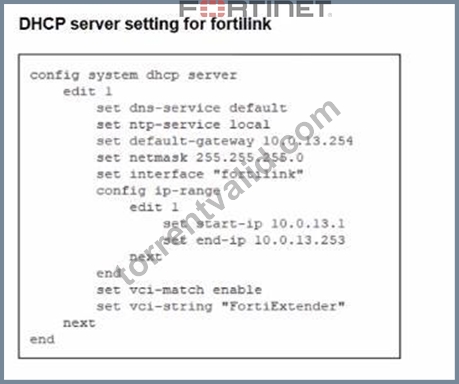
You are adding a new FortiSwitch to FortiGate for management. All necessary settings have been configured on FortiGate, but FortiSwitch remains offline. The cabling has been verified and is correctly connected.
Which misconfiguration might be preventing FortiGate from detecting FortiSwitch?
- A. The Fortilink interface setting ip-managed-by-fortiipam must be enabled.
- B. The Fortilink interface setting cype must be physical.
- C. The Fortilink interface has the wrong interface member.
- D. The DHCP server setting vci-string is misconfigured.
Answer: D
Explanation:
On FortiLink, FortiGate's built-in DHCP server is what gives FortiSwitch its IP so it can come under management. For automatic FortiSwitch onboarding, the DHCP server is usually set with:
set vci-match enable
set vci-string "FortiSwitch" "FortiExtender"
In the exhibit, the DHCP server for fortilink has:
set vci-match enable
set vci-string "FortiExtender"
Because theVCI string doesn't include "FortiSwitch", DHCP offers are only sent to clients whose Vendor Class Identifier matchesFortiExtender. The FortiSwitch never receives an IP, so it staysOffline.
* OptionBis wrong: member "port4" matches the physical cabling in the topology.
* OptionCis fine: FortiLink can be anaggregateinterface, not only physical.
* OptionA(ip-managed-by-fortiipam) is unrelated; FortiIPAM isn't required here.
NEW QUESTION # 76
When integrating FortiAuthenticator with an LDAP server, which parameter must be correctly defined to perform user lookups?
Response:
- A. DN (Distinguished Name)
- B. Group name
- C. Syslog filter
- D. Shared secret
Answer: A
NEW QUESTION # 77
Refer to the exhibits.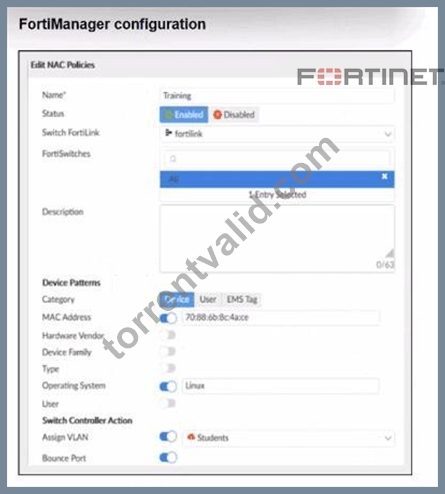

Examine the FortiManager configuration and FortiGate CLI output shown in the exhibit.
The NAC feature is being tested with a device connected to port2 on managed FortiSwitch S224SPTF19005867. The NAC policy has been applied to port2, and traffic was generated from the test device. However, the traffic from the test device does not match the NAC policy and remains in the onboarding VLAN.
What are two possible reasons why the test device is not being correctly classified by the NAC policy?
(Choose two.)
- A. The MAC address configured on the NAC policy is incorrect.
- B. Device detection is not enabled on VLAN 4089.
- C. The device operating system detected by FortiGate is not Linux.
- D. Management communication between FortiGate and FortiSwitch is down.
Answer: B,C
Explanation:
From the FortiManager NAC policy:
* Category =Device
* Match criteria includeMAC addressandOperating System = Linux
* Action =Assign VLAN "Students"
From the FortiGate CLI:
diagnose switch-controller switch-info mac-table ...
MAC: 70:88:6b:8c:4a:ce VLAN: 4089 Port: port2
diagnose switch-controller mac-device mac onboarding
VLAN 4089 MAC 70:88:6b:8c:4a:ce
So the device is stuck inVLAN 4089, which is theonboarding VLAN. No NAC policy is matched.
For a NAC policy to match, FortiGate needsdevice-identity information, which comes fromdevice detection on the VLAN / FortiLink interfaceplus theattributes that the policy expects(OS, MAC, etc.).
* A. Device detection is not enabled on VLAN 4089.
* If device detection is disabled on the interface/VLAN where the endpoint lives, FortiGate cannot learn OS / device info.
* Without this, the NAC engine cannot compare against the NAC policy (which relies on OS and other attributes), so the device remains in the onboarding VLAN.#This is a valid root cause.
* B. The device operating system detected by FortiGate is not Linux.
* The NAC policy explicitly requiresOperating System = Linux.
* If the endpoint is actually Windows/macOS, or the OS fingerprint is still "Unknown", the policy will never match, and the device stays in onboarding.#Also a valid reason.
* C. Management communication between FortiGate and FortiSwitch is down.
* CLI output (switch-info mac-table and mac-device) proves FortiGate is talking to the switch and sees MAC/VLAN/port information.#Not a valid reason.
* D. The MAC address configured on the NAC policy is incorrect.
* The exhibits show the MAC in the NAC policy matches the MAC appearing in the MAC table.
#Not the cause here.
NEW QUESTION # 78
Refer to the exhibits which show the FortiSwitch and FortiGate interface configurations.
FortiSwitch VLAN configuration
Port2 interface configuration
Which two statements describe how port2 handles tagged and untagged traffic? (Choose two.) Response:
- A. Port2 accepts ingress tagged traffic for VLAN IDs 4091 and 4093 only.
- B. Port2 assigns ingress untagged traffic to VLAN 100.
- C. Port2 accepts ingress untagged traffic for VLAN IDs 100, 4091, and 4093 only.
- D. Port2 tags egress traffic for VLAN 100.
Answer: A,B
NEW QUESTION # 79
......
Pass Your Fortinet Exam with FCSS_LED_AR-7.6 Exam Dumps: https://www.torrentvalid.com/FCSS_LED_AR-7.6-valid-braindumps-torrent.html
Verified FCSS_LED_AR-7.6 Bundle Real Exam Dumps PDF: https://drive.google.com/open?id=1vByKO8Qf-StzsNONZLGDJJgdyZsuKFrG